
Camera Sensors vs Megapixels: Why a Higher Number Doesn't Mean Better Photos

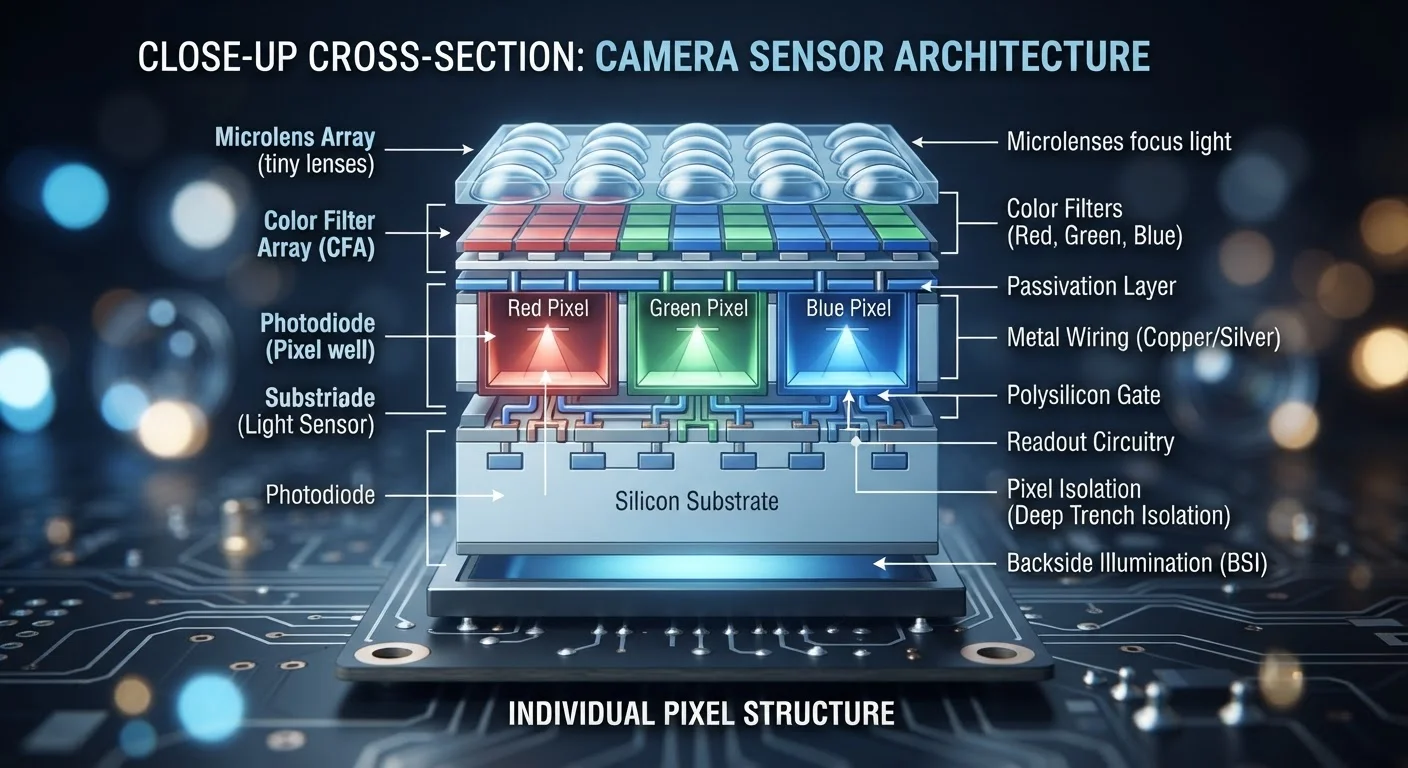
Photo: ArticleHood.com | Precision In Every Word editorial
Key Takeaways
- Megapixels measure image resolution, not overall photo quality.
- Sensor size is one of the most important factors in how good a photo looks.
- Larger individual pixels collect more light, improving low-light and dynamic range performance.
- Aperture and lens quality also shape the final image independently of megapixel count.
- A 12MP image from a large sensor often looks better than a 200MP image from a tiny one.
The Megapixel Myth
Smartphone makers have long used megapixel counts as a headline selling point - 48MP, 108MP, even 200MP. It's an easy number to compare on a spec sheet. But if megapixels told the full story, the most expensive cameras in the world would simply be the ones with the highest counts. They aren't.
A megapixel is one million pixels. A 12-megapixel camera captures about 12 million tiny squares of color data per image. A 48MP camera captures four times as many. More pixels means more detail can theoretically be recorded - but only if the sensor can actually deliver quality light data to each one of those pixels. That's where the spec sheet starts to break down.
As our guide to smartphone specs explains, numbers on a box rarely tell the full story of real-world performance. Megapixels are a prime example of that gap.
1/1.28"
Sensor size of a leading flagship smartphone
Compared to a full-frame camera sensor measuring 36mm × 24mm, even the largest smartphone sensors capture a fraction of the available light.
~1.4µm
Typical pixel size in a high-megapixel phone sensor
Some dedicated camera sensors feature pixels 4µm or larger - collecting significantly more light per pixel and reducing digital noise.
12MP
Resolution used by professional cinema cameras
Many high-end cinema cameras use sensors in the 12-17MP range, prioritizing pixel size and dynamic range over resolution count.
What the Sensor Actually Does
The image sensor is a flat chip - typically measured in fractions of an inch - that sits behind the lens. Its job is to convert incoming light into digital information. Think of it like a bucket catching rain: a bigger bucket catches more water. A larger sensor catches more light, and more light means your camera has richer, more accurate data to work with when building your image.
When manufacturers pack more megapixels onto a small sensor, each individual pixel gets physically smaller to make room. Smaller pixels collect less light per pixel, which leads to a phenomenon called noise - the grainy, speckled look you see in photos taken in dim conditions. A 12MP image from a large sensor with big pixels will consistently look cleaner and more detailed in real-world use than a 200MP image from a physically tiny sensor with microscopic pixels.
Sensor Size Notation Can Be Confusing
This is why dedicated cameras - including mirrorless and DSLR models - still outperform smartphones in many scenarios. Their sensors are simply much larger, enabling dramatically better light collection regardless of megapixel count.
Aperture, Lenses, and the Full Picture
Sensor size isn't the only variable that shapes image quality. Aperture - the adjustable opening in the lens - controls how much light reaches the sensor. A wider aperture (expressed as a lower f-number, such as f/1.8 versus f/4.0) lets in more light, which benefits low-light photography and enables that blurred background effect known as bokeh.
Lens quality also matters independently. Optical elements that are poorly aligned, coated, or manufactured can introduce distortion, chromatic aberration (color fringing), or softness that no amount of megapixels can correct in post-processing.
Image processing software plays a growing role too. Computational photography - the algorithms that process data after the shutter fires - can significantly improve sharpness, exposure, and noise reduction. This is part of why the gap between flagship smartphone cameras and dedicated cameras has narrowed in recent years, even when sensor size differences remain substantial.
Look at Sample Photos, Not Just Specs
This same principle of "more numbers doesn't mean better" applies in other tech contexts. Our article on screen resolution and pixel count walks through a parallel concept for displays.
When Megapixels Do Matter
Higher megapixel counts aren't meaningless - they're just narrowly useful. The scenarios where they genuinely make a practical difference include:
- Large-format printing: Billboards, posters, and fine art prints require high resolution to avoid visible pixelation at large sizes.
- Heavy cropping: If you regularly crop a small portion of a photo to reframe it, starting with more pixels gives you more to work with.
- High-resolution professional workflows: Commercial photographers shooting product or architectural images sometimes need the extra detail for client deliverables.
For the vast majority of consumers - sharing photos on social media, viewing on screens, or making standard prints - the difference between 12MP and 50MP is largely invisible. What you'll notice far more is how the camera handles a dimly lit restaurant or a fast-moving subject. Those qualities come from sensor size, aperture, and processing - not megapixels.
If you find yourself evaluating a device's camera, focus on real-world sample images and reviews over spec comparisons. And if you're curious about how photography itself shapes experiences - not just pixels - our piece on the photography trap offers a thoughtful counterpoint.
Frequently Asked Questions
The content on this site is for informational purposes only and is not a substitute for professional advice. Always consult a qualified professional for guidance specific to your situation.