
Operating System vs Firmware vs App: Why the Distinctions Matter

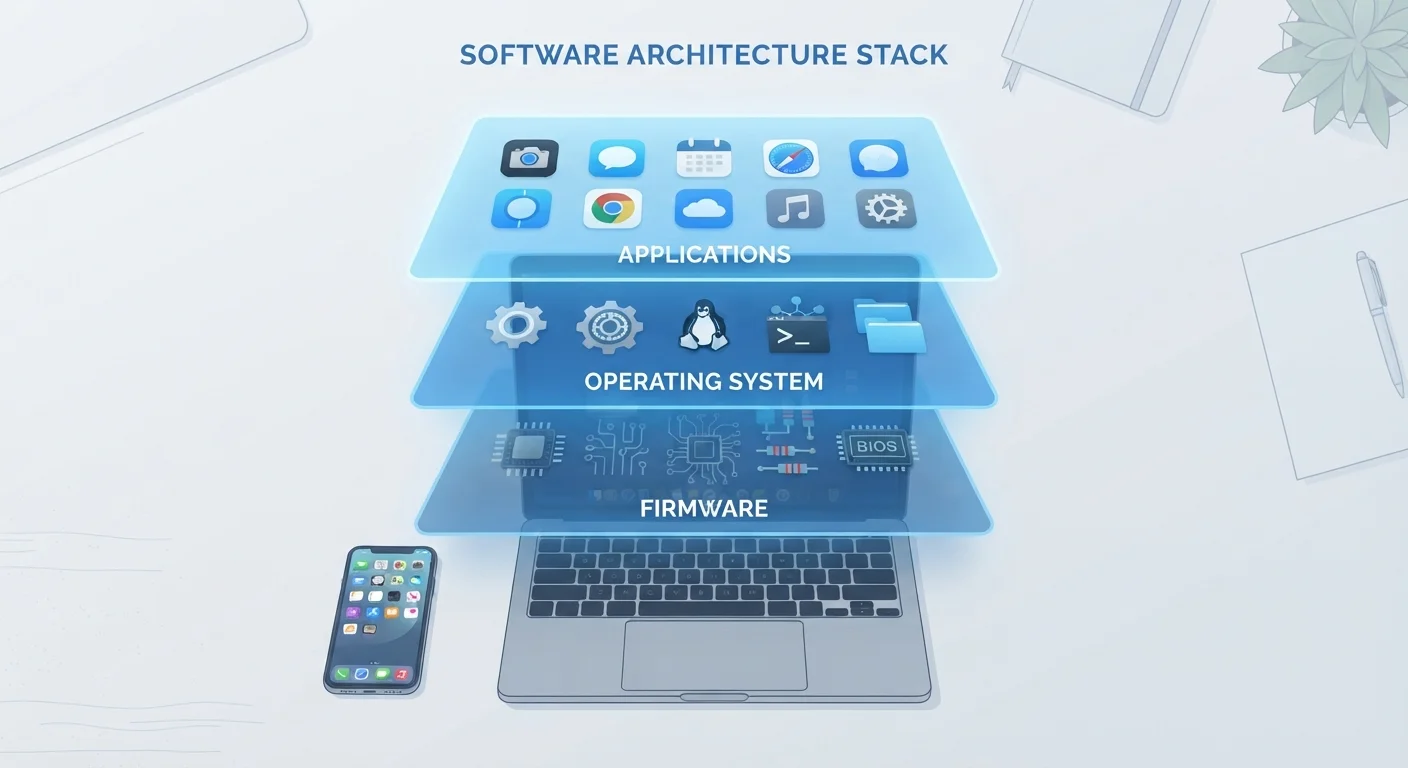
Photo: ArticleHood.com | Precision In Every Word editorial
Key Takeaways
- Firmware is low-level code baked into hardware that rarely changes and controls basic device behavior.
- The operating system manages hardware resources and provides the environment that apps run in.
- Apps are user-facing programs that rely entirely on the OS to function.
- Updating each layer serves a different purpose: firmware fixes hardware bugs, OS updates add features and security patches, app updates improve individual programs.
- Understanding these layers helps you troubleshoot issues and decide which update to apply.
Firmware: The Closest Thing to Hardware
Firmware is software that is embedded directly into a hardware component at the factory. It operates at the lowest level, telling a piece of hardware the most fundamental rules of its own existence - how to start up, how to accept instructions, how to communicate with other components.
Think of the firmware in your router, your TV's display panel, or the storage chip inside your phone. None of those components would know how to behave without firmware telling them what to do. Because firmware is so tightly coupled to physical hardware, it changes infrequently and updates are usually released only to fix bugs, improve stability, or patch security flaws at the hardware level.
Always Check for Firmware Updates Separately
When manufacturers do release firmware updates, users often don't notice them because the process is quiet and the changes are invisible - but they can meaningfully improve performance or close serious security gaps. This is true for everything from your home router to the controller board inside a smart thermostat. See our guide on how smart home devices are structured for more context.
The Operating System: The Layer That Makes Everything Usable
The operating system (OS) sits above the firmware and acts as the general manager of your device. It allocates memory, manages processing power, handles file storage, controls the display, and creates the stable environment that every app depends on. Without an OS, a device would have no way to run multiple tasks, respond to your input, or connect to a network in any organized way.
On a laptop, this is Windows or macOS. On a phone, it's Android or iOS. On many smart home devices, it's a stripped-down Linux variant or a proprietary system you never directly interact with. The OS abstracts the complexity of the hardware beneath it and presents a consistent, workable surface upward to apps.
3
Distinct software layers in most modern devices
Firmware, operating system, and apps each serve a different role and are updated independently of one another.
~90%
Of smartphone security patches delivered via OS updates
Security researchers generally find that OS-level patches address the vast majority of exploitable vulnerabilities in consumer devices.
OS updates are significant because they touch every part of how the device behaves. A single OS update might patch a security vulnerability, change how memory is managed, add a new feature to the camera system, and update the visual interface - all at once. For a deeper look at how hardware specs relate to what the OS works with, see what smartphone specs actually mean.
Apps: The Layer You Actually Interact With
Apps are the programs you open, use, and close. A messaging app, a weather app, a banking app, a browser - these are all software written to run on top of a specific operating system. They don't communicate with hardware directly; they make requests through the OS, which handles the actual interaction with memory, storage, network, and display hardware.
This architecture is why an iPhone app won't run on Android and vice versa - the app is written for a specific OS's rules and interfaces. It also explains why apps sometimes stop working after an OS update: the interface the app relied on may have changed. You can explore the distinction between different app types in our article on native apps vs. web apps, which covers how delivery method affects speed and storage. For a broader overview of apps and software, the Apps & Software hub is a useful starting point.
Web Apps Don't Follow the Same Rules
Why These Distinctions Matter for Everyday Users
Understanding these three layers gives you a practical framework for troubleshooting. If an individual app crashes, the problem likely lives in that app itself. If multiple apps behave strangely or a feature stops working across your whole device, the OS may need an update or has a bug. If a hardware component like the Wi-Fi radio or speaker acts erratically regardless of which app you use, a firmware update for that component could be the fix.
It also helps you understand update notifications. Firmware updates are rare but important - don't ignore them. OS updates are regular and carry significant security implications. App updates are frequent and usually safe to apply routinely. Treating each type of update with the right level of attention, rather than lumping them all together, keeps your devices more secure and stable over time.
Frequently Asked Questions
The content on this site is for informational purposes only and is not a substitute for professional advice. Always consult a qualified professional for guidance specific to your situation.